

Reviewed by Olympus Learning | Updated Term 2, 2026
Review of the Best Study Apps for High School Students and Exams
The right app can genuinely change how much you get done in a study session. The wrong one just gives you something else to stare at.
We have put together a guide to the apps that high school students are actually using and getting real results from – from Year 7 all the way through to Year 12 – including two that have become genuinely addictive (in a very good way) among students right now.
Whether you struggle to put your phone down, want to compete with your friends to see who studies the most, or just need to see exactly where your time is going, there is something here for you.
Study apps in this guide
- YPT (Yeolpumta) — Study Timer, Groups and Real Competitive Rankings
- Focus Tree — Build a Garden Together While You Study
- Forest — Put Your Phone Down and Grow a Tree
- Anki — Flashcards That Actually Work
- Notion — Your Second Brain
- Goodnotes — Digital Notes Done Right
- Which app is right for you?
1. YPT (Yeolpumta) — Study Timer, Groups and Real Competitive Rankings
This study app is best for: Students who want to track exactly how much they study per subject, compete with friends, and stay accountable as a group
Recommended year group: Year 7–12 | Particularly popular: Years 10, 11 and 12
What is it?
YPT — short for Yeolpumta, a Korean app that has become one of the most popular study tools among high school students worldwide — is a study stopwatch that does far more than just count time.
It lets you set up each of your subjects, start a timer when you begin studying, pause it when you lose focus, and build up an accurate record of exactly how much time you have put into each subject. Over five million students use it globally.
How this study app works
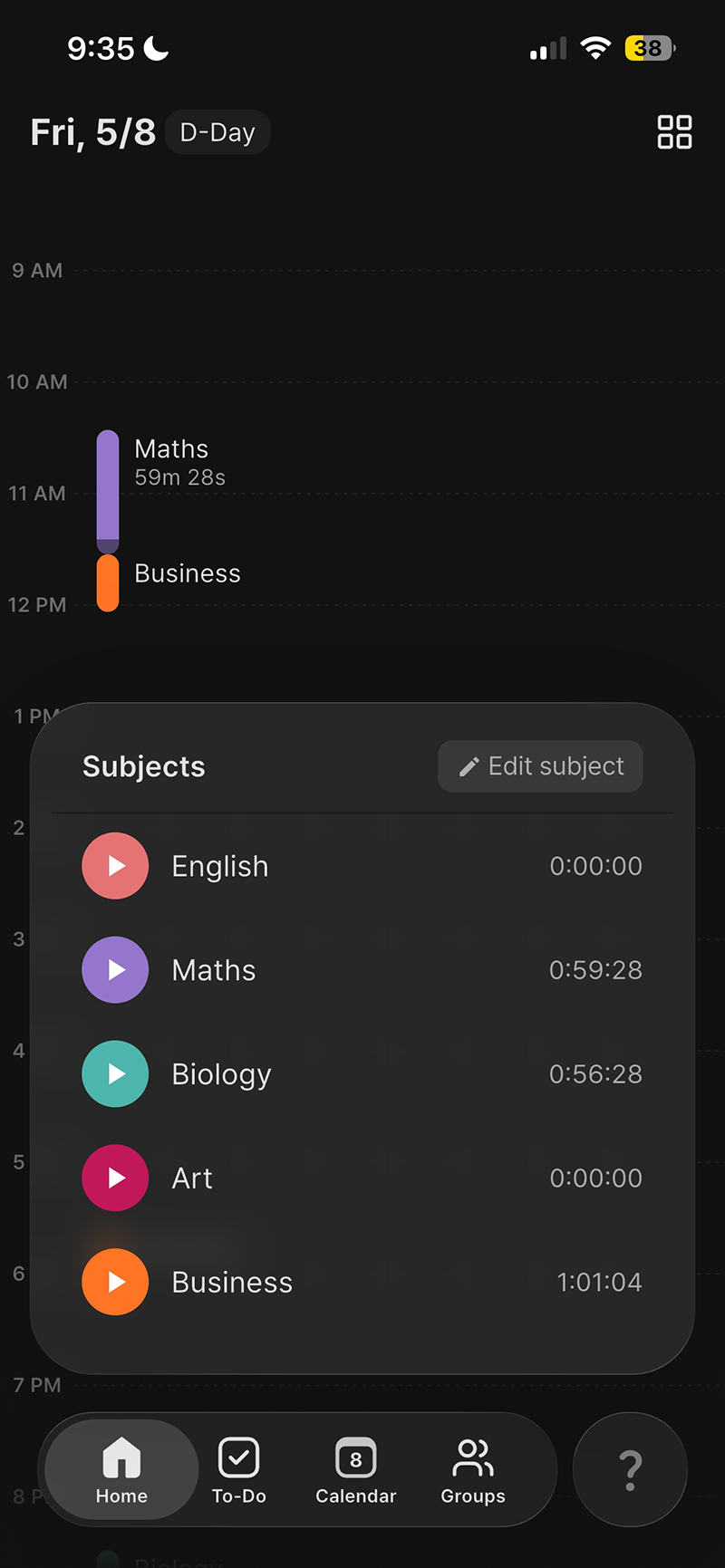
When you open YPT, you set up your subjects — Maths, English, Biology, Business, whatever you are studying.
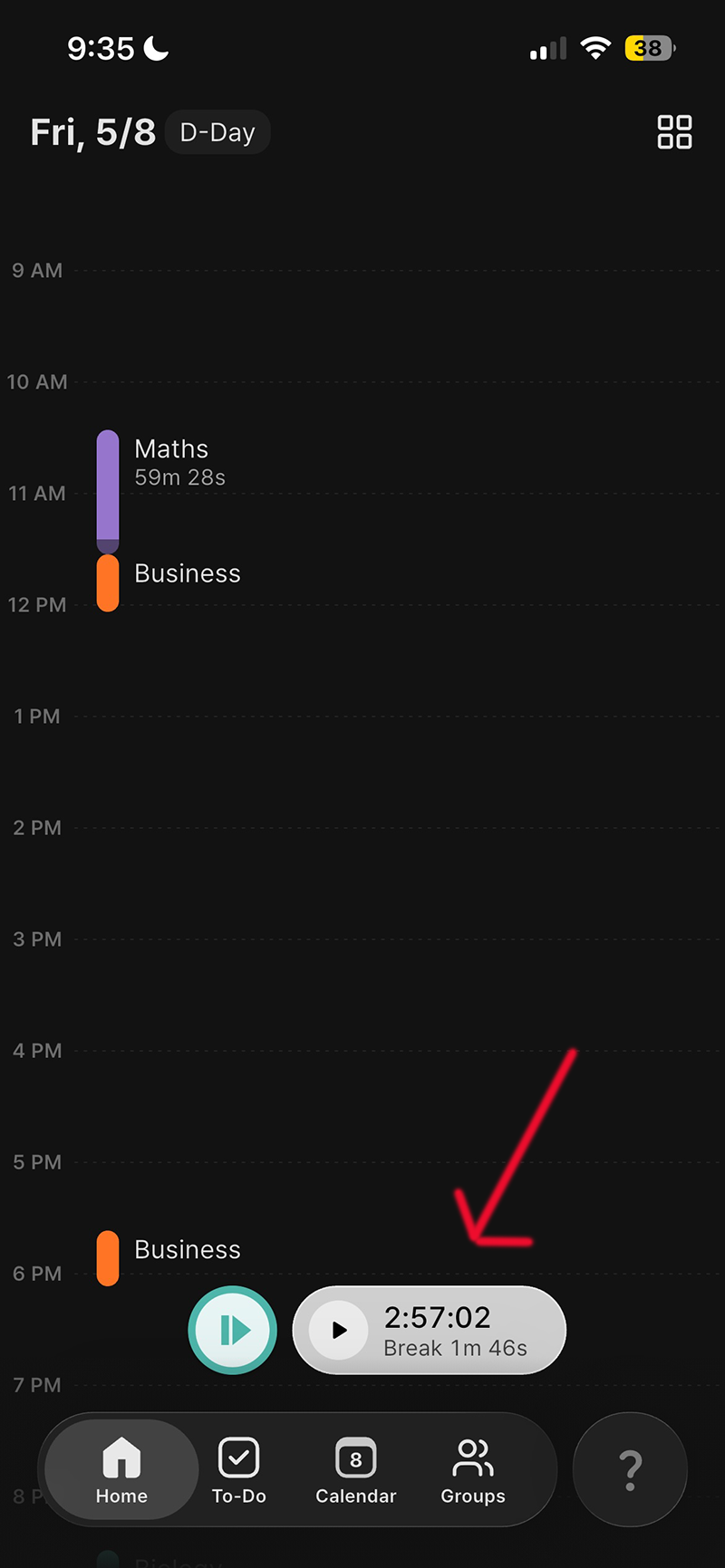
You tap the subject, hit start, and the timer runs. Stop it the moment you stop actually studying.
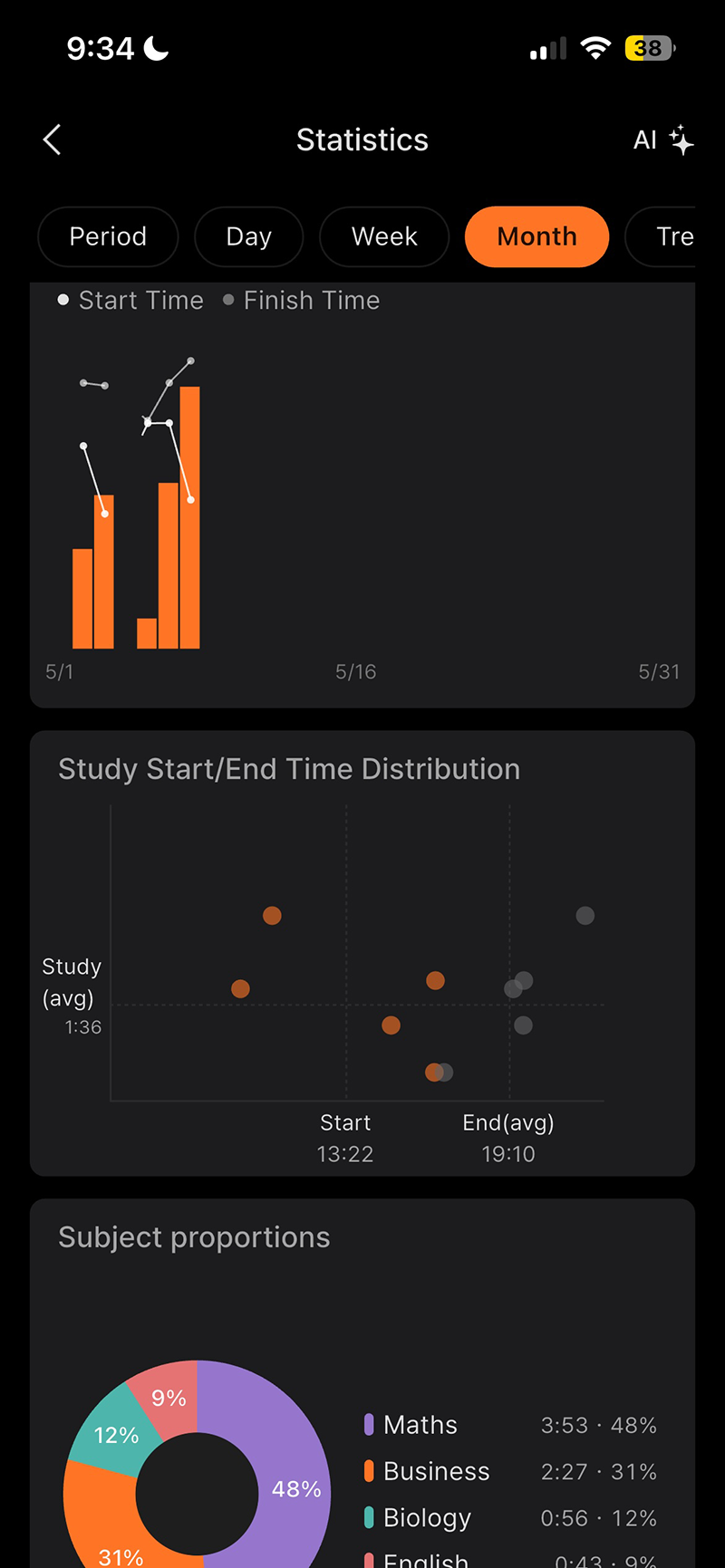
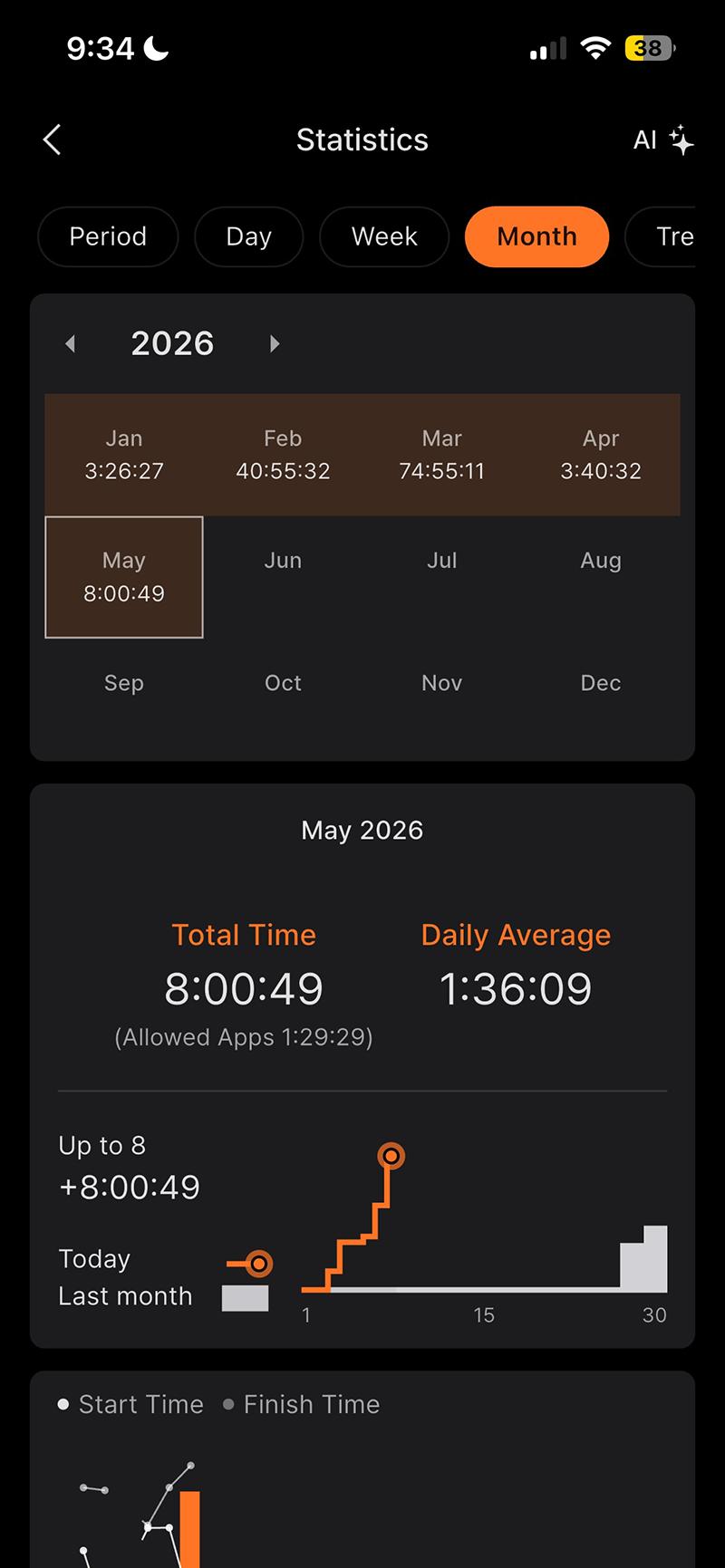
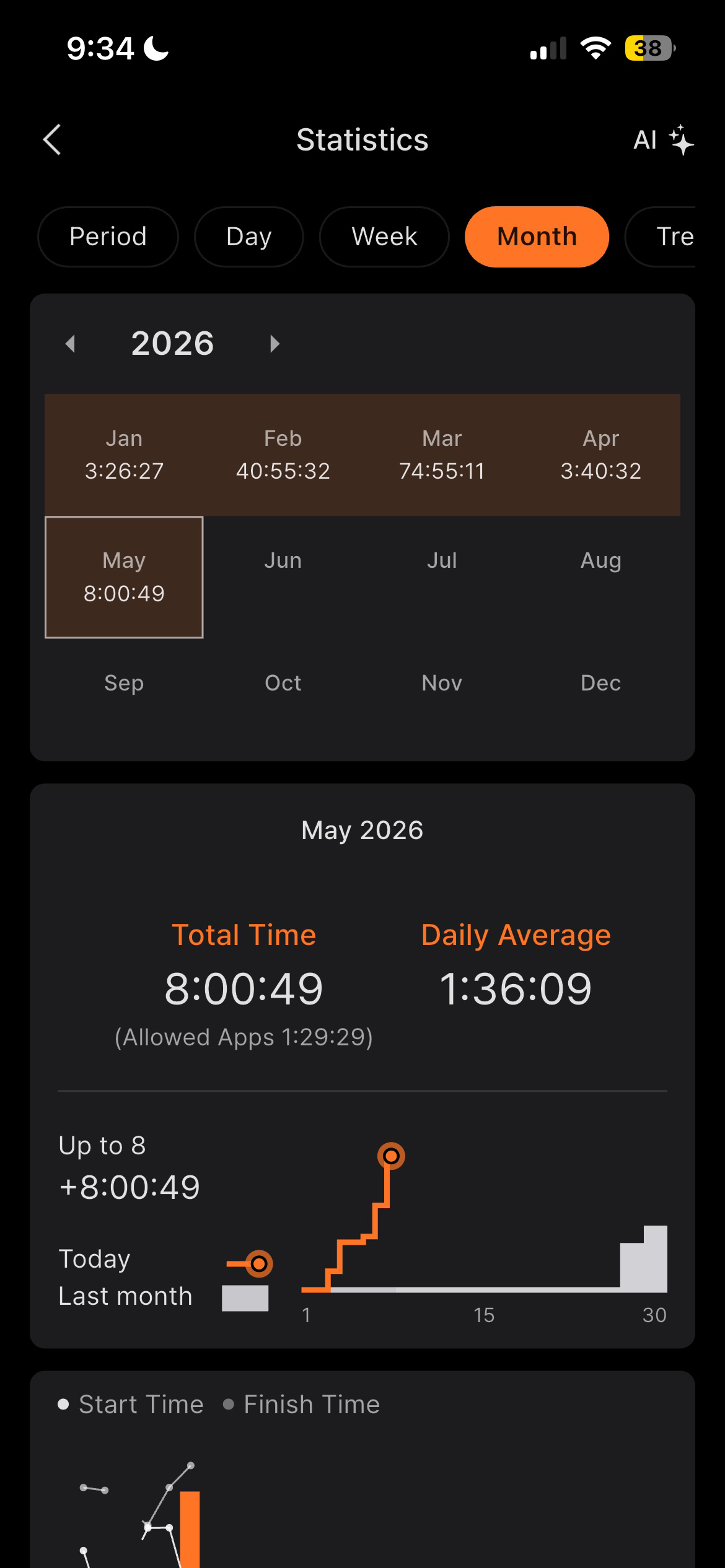
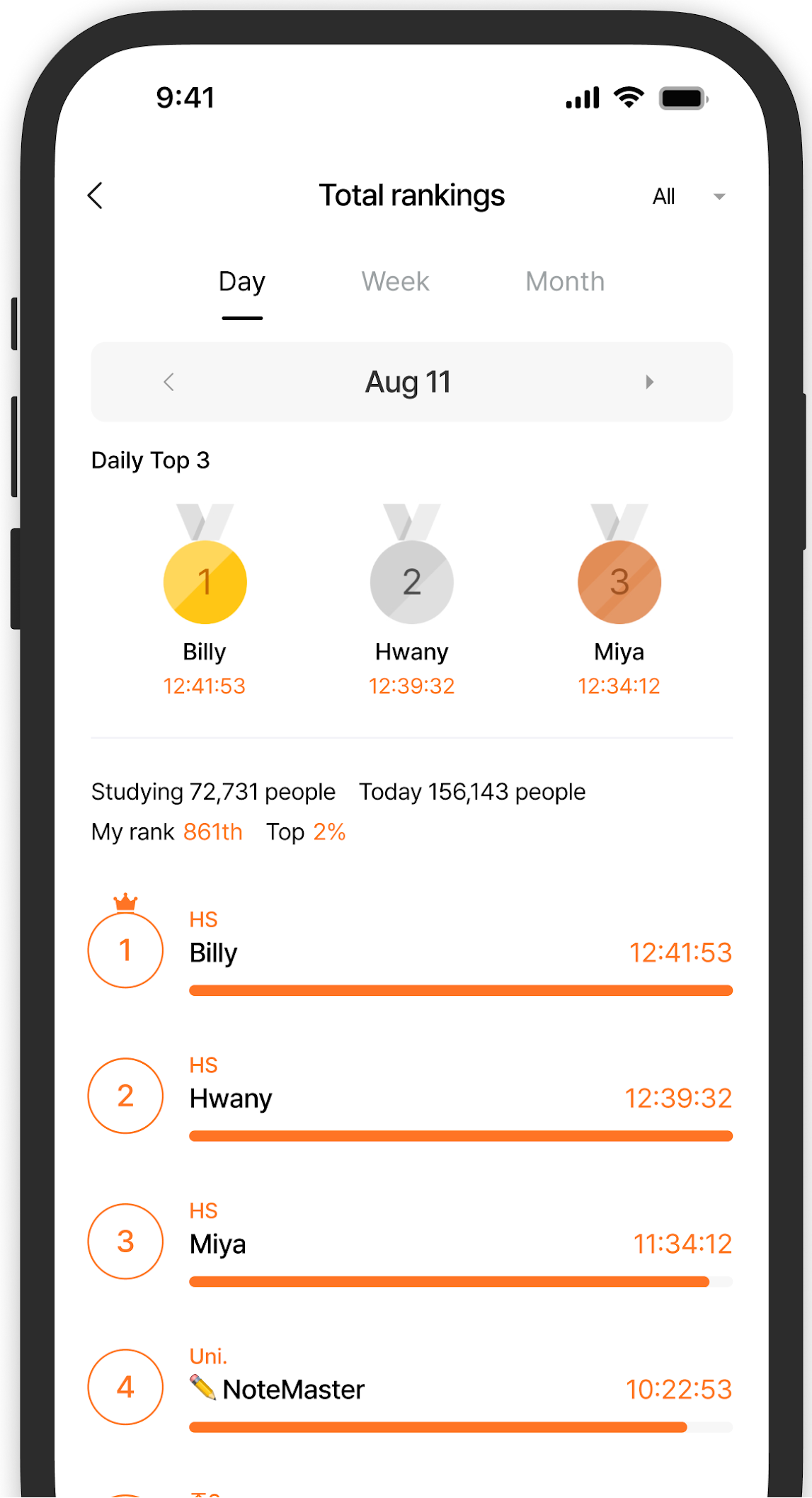
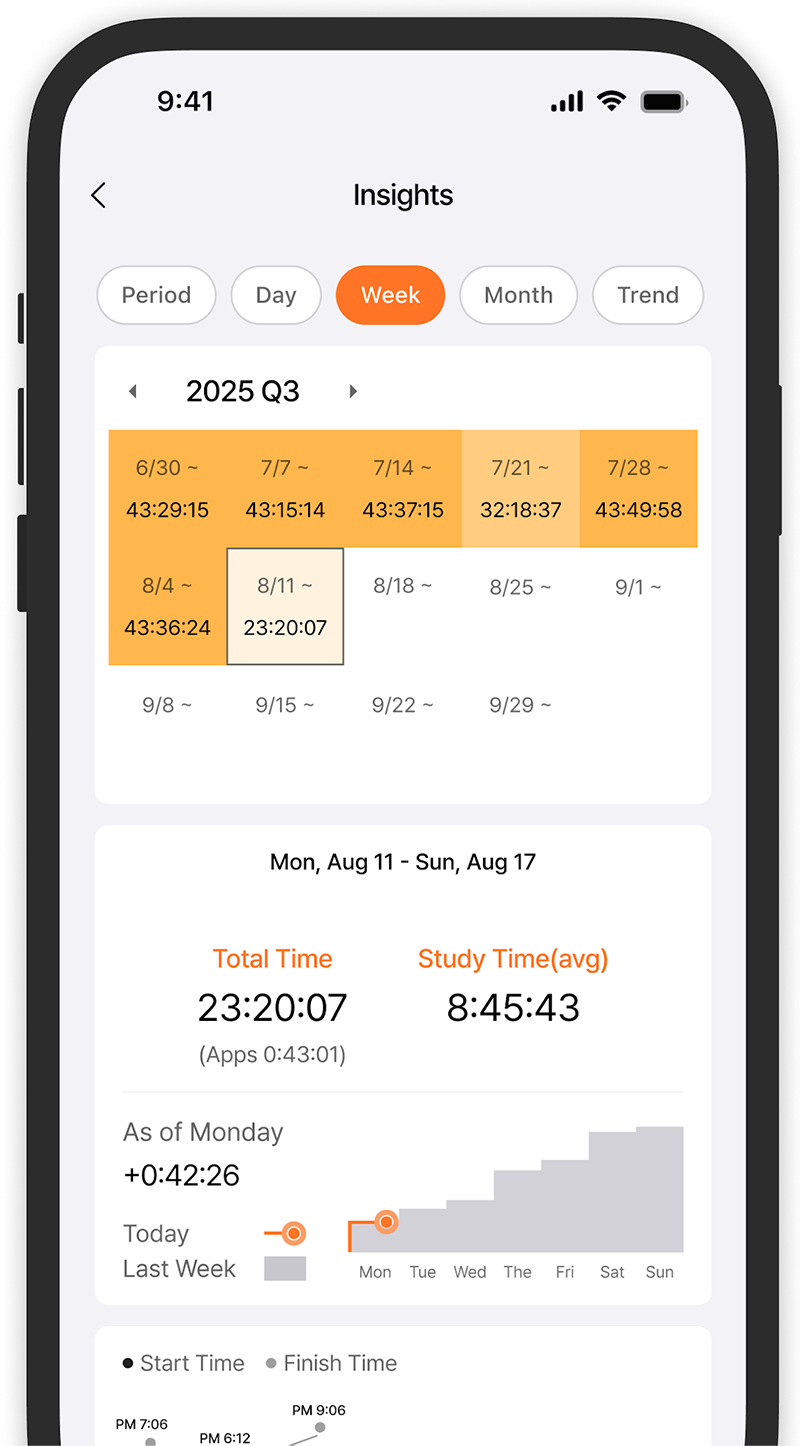
At the end of the day, week, or month, you get a detailed breakdown — pie charts, bar graphs, total hours, daily averages — showing exactly where your time went.
The screenshots above show exactly this in action: subjects colour-coded, a calendar view of study days, a “Subject ratio” chart showing the split across Maths, Business, Biology and English over a 29-day period, and monthly totals tracked all the way back to January.
Other features include:
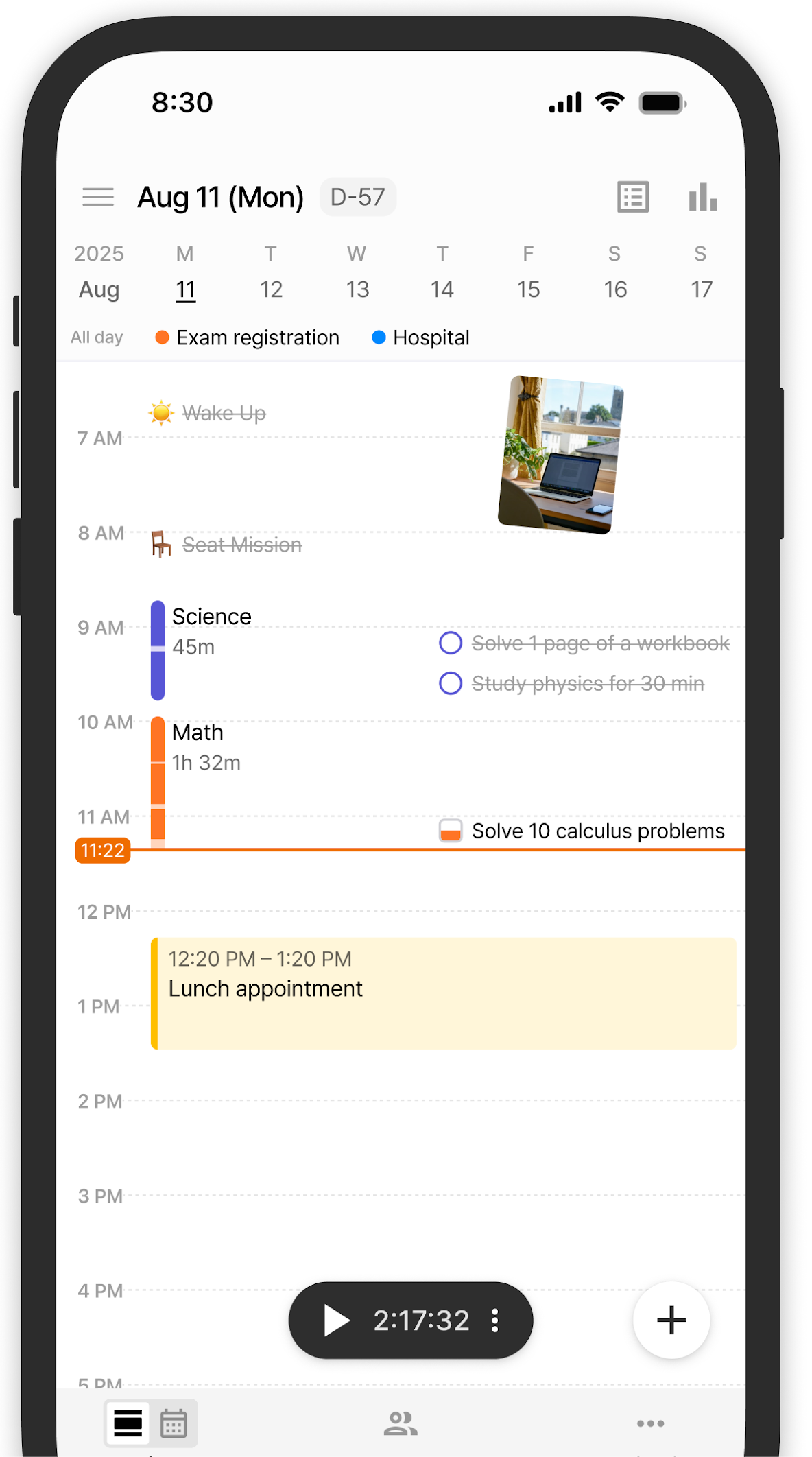
- A to-do list and daily planner built in
- A D-Day counter for exam and assessment dates
- Realtime ranking within your study group
- A calendar view that darkens the more you study on a given day — a simple but powerful visual motivator
Block Snapchat, TikTok and Instagram while you study
One of YPT’s most powerful and underrated features is app blocking.
When you start a study focus session, YPT can lock out distracting apps on your phone — Snapchat, TikTok, Instagram, YouTube — so that your phone becomes a study tool rather than a distraction.
The moment your study session starts, those apps are blocked. The moment it ends, they come back.
This means students do not have to rely on willpower alone. The phone is simply not available for distraction while the timer is running.
For students who know they have a habit of picking up their phone mid-session, this feature alone is worth downloading the app for.
On iPhone: iOS limits third-party apps from blocking other apps directly. However, you can use iPhone’s built-in Screen Time feature (Settings → Screen Time → App Limits) alongside YPT to achieve the same result — set a limit of one minute per day on social media apps during your study hours.
The social and competitive side — and why it actually works
This is where the YPT study app really stands out from a standard timer app and where we were surprised to hear just how much students loved this.
The Groups feature lets you create or join a study group with your friends, and from that moment it becomes genuinely competitive.
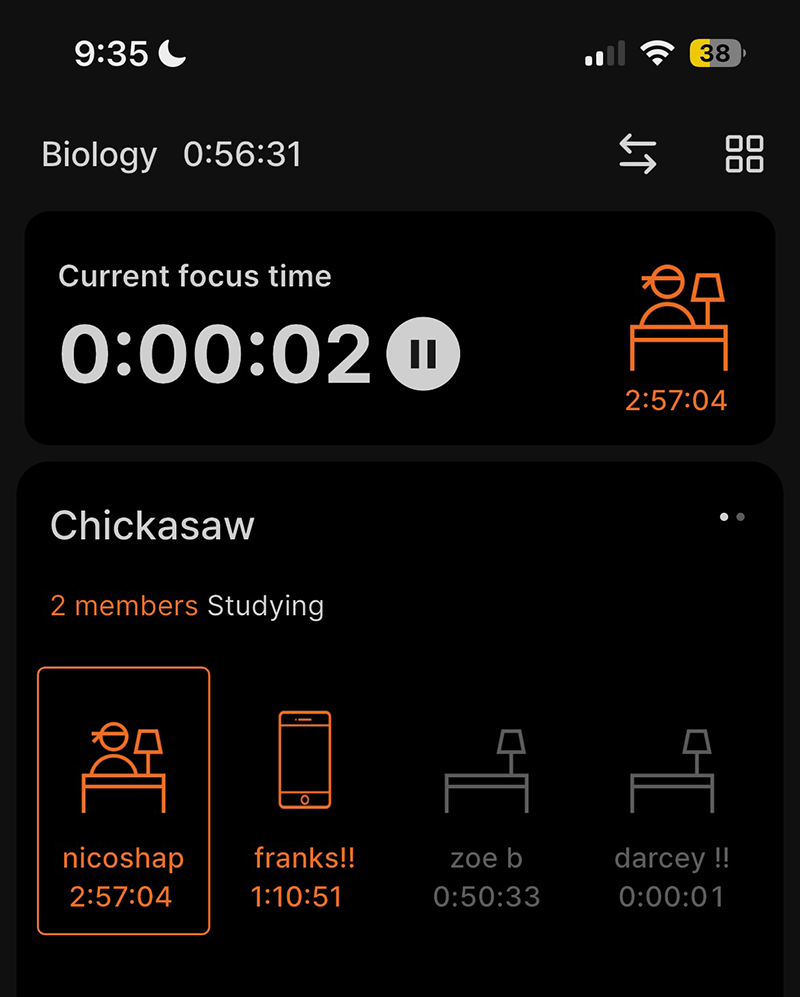
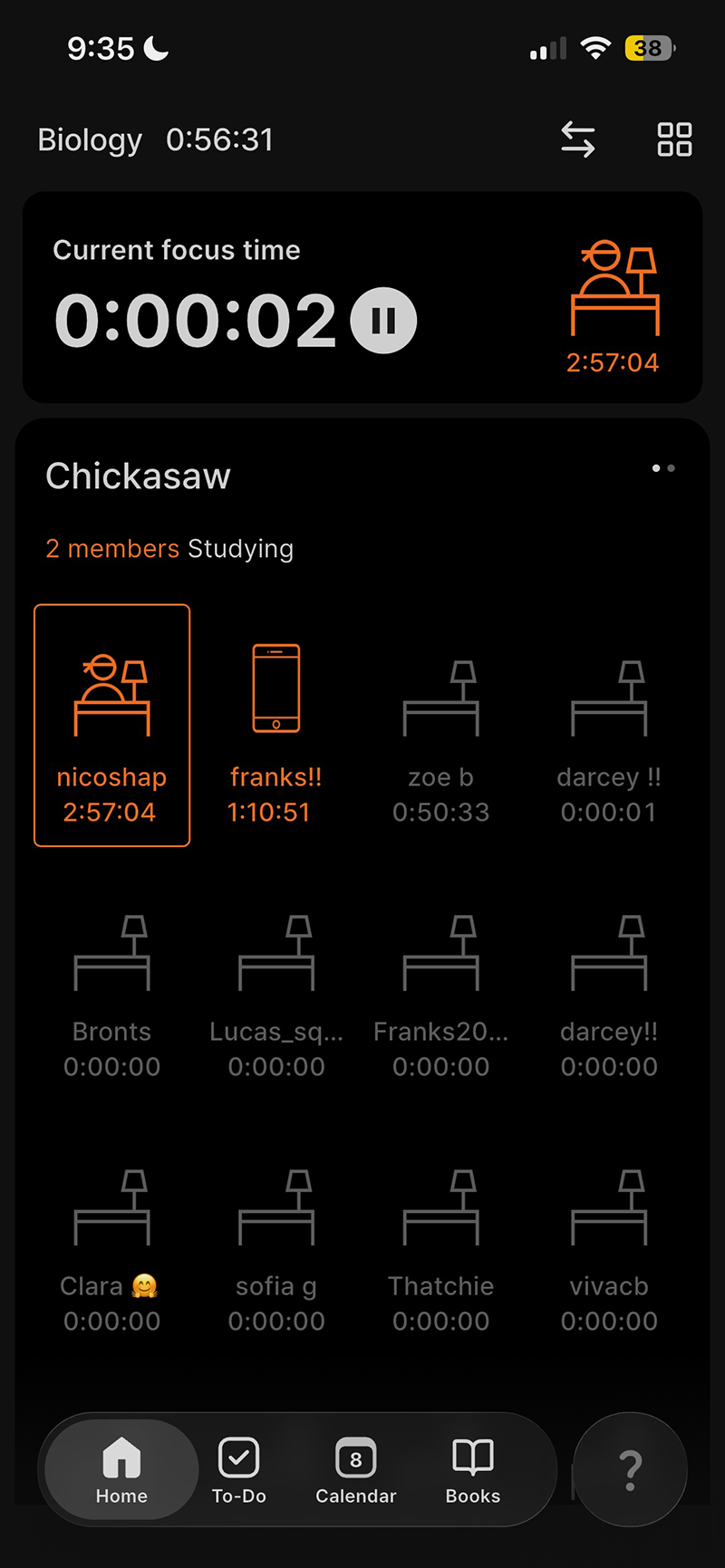
You can see exactly who in your group is studying right now, what subject they are on, and how long they have been going.
There is a real-time leaderboard showing total study hours across the group.
We spoke to multiple students across year 11 and year 12 who always used this feature amongst their school friends.
Seeing a friend sitting at the top of the leaderboard with four hours logged by 9pm on a school night is the kind of social pressure that works – not because anyone is forcing you, but because you genuinely do not want to be at the bottom of the group.
Students who use the YPT study app with their friend group consistently, report studying longer and more regularly than they did before, simply because the visibility of everyone’s effort creates a friendly but very real sense of competition.
The screenshots below show a group called “Chickasaw” with multiple students actively studying – you can see each member’s avatar, their current subject, and how long they have been running their timer.
Some are at nearly three hours, others just starting. That live view of your friends’ effort is a remarkably effective motivator at any year level.
Why YPT Study App works across all year groups
YPT study app for Year 7 and 8 students: YPT builds the habit of tracking study time from the beginning of high school – a foundation that pays dividends in later years.
YPT study app for Years 9 and 10: the subject breakdown helps students identify where they are strong and where they are falling behind before it matters.
YPT study app for Years 11 and 12: the data becomes genuinely strategic —-knowing you have spent 65% of your study time on Maths and almost nothing on English is information you can act on.
Cost
The YPT study app is FREE to download and use.
There is an optional premium subscription for extra features, but the core app – timer, subjects, groups, statistics – is completely free.
Most students we spoke to were using the free version of the YPT study app.
How to download
- iPhone: Download here from the Apple App Store
- Android: Download here from Google Play
What students say about YPT
“I had no idea how unbalanced my study was until I started using YPT. I thought I was spending equal time across all my subjects — turns out I was doing almost three times as much Maths as English. Seeing the pie chart every week made me actually fix it.”
— Ava, Year 12, Sydney
“The competitive side is real. My friend group made a study group and now I genuinely check the leaderboard before I go to bed. If someone has put in five hours and I have only done two, I go back to my desk. It sounds a bit intense but honestly it has been the biggest change to my study habits since Year 10.”
— James, Year 11, North Shore
2. Focus Tree — Build a Garden Together While You Study
Best for: Students who want a fun, visual way to stay off their phone, compete with friends, and build something beautiful as a group
Recommended year group: Year 7–12 and university | Particularly popular: Years 9, 10, 11 and 12
What is it?
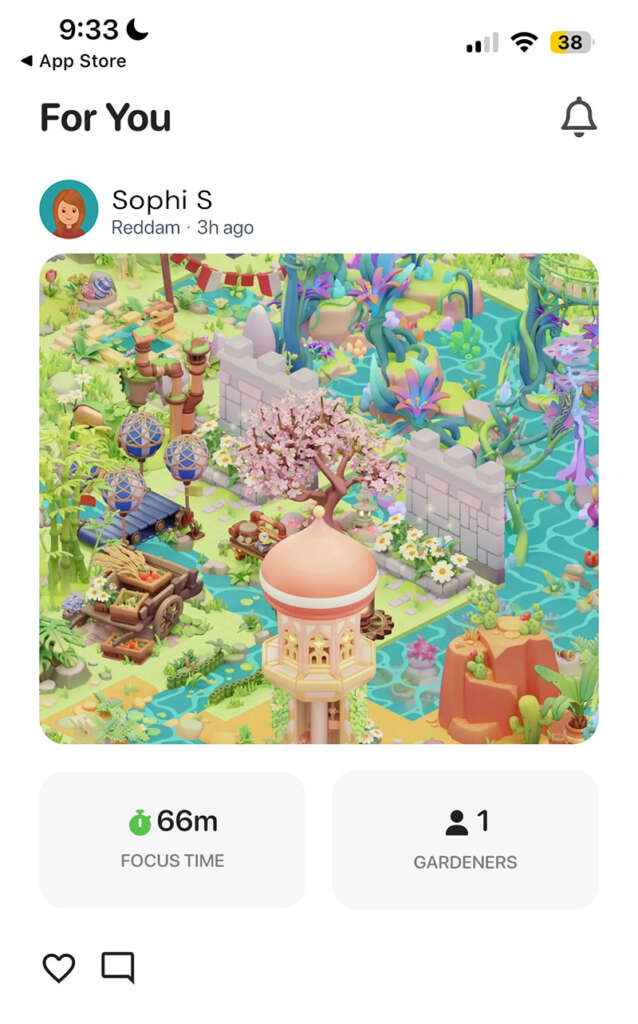
Focus Tree is a focus app that turns your study sessions into a garden.
Every time you study – staying in the app and not checking social media – you earn tiles that you use to build and customise a beautiful 3D island garden. You can share you results with your friends.
The longer and more consistently you study, the more your garden grows.
You can join shared gardens with friends, so your whole study group is literally building something together.
How it works
Start a focus session, put your phone down, and earn coins the longer you stay focused.
Those coins buy tiles for your garden. You earn one free tile per day just for showing up and studying, which is a gentle but effective daily nudge.
There are themed tile packs, daily deals in the shop, and limited-edition items — giving students something to work towards beyond just a good grade.
Other features include:
- Pomodoro timer mode (study intervals with breaks) or open-ended focus sessions
- Flashcard creation with spaced repetition — built directly into the app
- Shared gardens with friends — your focus contributes to a group island
- App blocking during focus sessions
- A social feed where you can see friends’ focus sessions and gardens
Block Snapchat, TikTok and Instagram while you study
When you start a focus session in Focus Tree, the app blocks access to other apps on your phone. Snapchat, TikTok, Instagram, YouTube – all locked out for the duration of your session.
Your phone becomes a single-purpose study device until the timer ends.
This is one of the most important features for students who know they struggle with distraction.
The garden mechanic already gives you a reason to stay in the app — but the app blocking removes the temptation entirely.
You do not have to decide not to check TikTok. The decision is made for you.
Deep Focus mode (premium feature) takes this further — locking the app so that you cannot exit the focus session early even if you want to. For students who really struggle to stay on task, this is worth the upgrade.
The social and competitive side — and why it actually works
Focus Tree has a social dimension that makes it genuinely compelling for friend groups.
When you join a shared garden with your friends, every focus session you complete contributes tiles to the group’s island.
The garden grows when everyone is putting in the work – and it stalls when they are not. That shared ownership creates a sense of responsibility that a personal timer never can.
From first-hand student experience, the competitive side is real and it matters.
Watching a friend’s garden grow faster than yours because they studied more hours that week is surprisingly effective motivation.
The social feed shows your friends’ sessions – how long they focused, what they earned, what their garden looks like – and that visibility creates a low-pressure but persistent nudge to keep up.
Students describe checking the feed after dinner and immediately going back to their desk because they could see others were still going.
The garden itself is the other piece. Because you and your friends are building it together, there is a shared stake in the outcome that goes beyond points or rankings.
Students who have used Focus Tree in a group describe a genuine sense of pride in what they have built – and that pride is a far more sustainable motivator than anxiety about exams.
Why it works across all year groups
For younger students in Years 7 and 8, the garden idea makes studying feel like a creative activity rather than a chore – which is exactly what building study habits at that age requires.
For Years 9 to 12, the social accountability of a shared garden and the competitive element of the feed is what keeps students coming back to their desks night after night.
Side note: University students have told us how they love this app too!
Cost
The Focus Tree study app is free to download and use.
There is a premium subscription for “Deep Focus” features and some exclusive garden items, but the core focus timer, garden, and social features are free.
Garden tiles are earned by studying – no real money required.
How to download
- iPhone: Download Focus Tree from the Apply App Store
- Android: Download Focus Tree from Google Play
- Requires iOS 16.1 or later on iPhone
What students say about Focus Tree
“My friend group has a shared garden and we are all obsessed with it. We check each other’s sessions, we compete over who earns the most tiles, and we sometimes argue about which tile to buy next. It sounds ridiculous but I have studied more consistently this term than I ever have — just because I do not want to be the one who lets the garden down.”
— Sophie, Year 12, Inner West Sydney
“I opened the social feed one night and saw three of my friends had already done two-hour sessions. I was about to go to sleep. I did not. Focus Tree basically guilt-trips you into studying and somehow that’s a good thing.”
— Lachlan, Year 11, Northern Beaches
Forest — Put Your Phone Down and Grow a Tree
Best for: Students who need help staying off their phone and want a simple, beautiful focus timer
Recommended year group: Year 5–12 | Great starting point for: Years 7 and 8
What is it?
Forest is the original gamified focus and study app, and it remains one of the most effective.
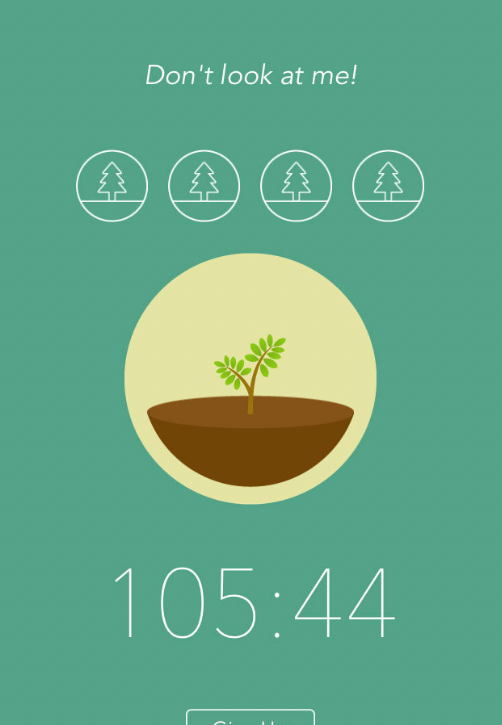
The concept is brilliantly simple: set a timer, plant a virtual tree, and keep the app open.
If you leave the app to check Instagram or TikTok, your tree dies.
Stay focused and your tree grows — and joins a growing forest that represents your entire study history.
How it works
Open the Forest study app, set a timer between 10 minutes and 2 hours, and plant. Every completed session adds a tree to your personal forest.
Over weeks and months, that forest becomes a visual record of every hour you have spent focused.
There is a friends feature so you can study alongside people you know, and a whitelist function that lets you specify which apps are allowed during a session – useful if you need to access a dictionary or calculator.
Forest also has a real-world dimension: virtual coins earned through focus sessions can be donated to plant actual trees through their partnership with the NGO Trees for the Future.
Staying off Snapchat and TikTok
Forest’s entire design is built around keeping you away from other apps. On iOS 16 and above,
Forest’s Allow List feature lets you specify exactly which apps are permitted during a focus session – everything else is effectively off limits while your tree is growing.
If you leave the Forest study app to open Snapchat or TikTok, your tree dies. Most students find that is all the motivation they need.
Why it works across all year groups
The Forest study app works because killing a tree feels bad — and that small psychological cost is surprisingly effective at keeping you in the app.
Research from the University of Texas found that having your phone visible, even face down and silent, reduces cognitive capacity.
Forest study app gives you a concrete reason to put it away. It is also dead simple to use, which makes it ideal for younger students in Years 7 and 8 who are just starting to build independent study habits.
Cost
The Forest study app is free on Android. A one-time purchase of approximately $3.99 on iPhone — one of the best value purchases a student can make.
How to download
- iPhone: Download Forest Stay Focused in the Appl App Store — one-time purchase ~$3.99
- Android: Download Forest Stay Focused in the Google Play Store — free
- Browser extension: Available free for Chrome
- Tutorial: How to use Forest App
Anki — Flashcards That Actually Work
Best for: Students with heavy memorisation loads — Biology, Chemistry, History, Economics, Languages
Recommended year group: Year 9–12 | Biggest impact in: Years 11 and 12
What is it?
Anki is the gold standard for memorisation.
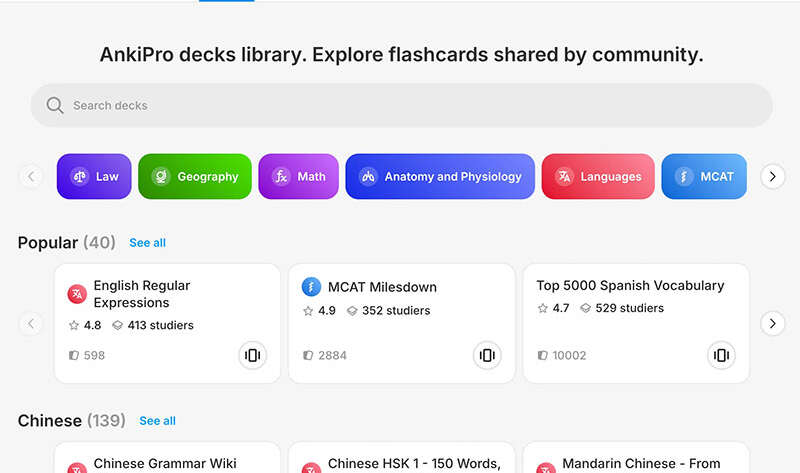
It uses a scientifically proven method called spaced repetition – showing you flashcards at the optimal time interval before you would forget them.
You rate how well you remembered each card, and Anki uses that to schedule your next review. Cards you know well appear less frequently.
Cards you struggle with appear more often.
How it works
Create a deck for each subject. Add flashcards – a question on the front, the answer on the back.
Do your daily review, which typically takes 10–20 minutes and covers everything due that day.
Over weeks, Anki builds a complete picture of your knowledge and keeps everything fresh with minimal time investment.
There are also thousands of pre-made decks for common high school subjects available on AnkiWeb, created by other students – so for many subjects you can start reviewing immediately without making your own cards from scratch.
Why it works across all year groups
For content-heavy subjects at any level – Science, History, Geography, Languages – the ability to memorise accurately and retain information under test conditions is what separates students who prepared from those who just read their notes.
Anki is the most effective memorisation tool available, and the daily review habit, once built, takes surprisingly little time and produces results that passive re-reading simply cannot match.
Cost
The Anki app is free on desktop (ankiweb.net) and Android.
The iPhone app is a one-time purchase of approximately $37 — expensive, but a worthwhile investment for students in Years 11 and 12 with heavy content loads.
Alternatively, use the free desktop version and the free AnkiWeb browser version for reviewing on your phone.
How to download
- Desktop (free): Download at Ankiweb
- Android (free): Download AnkiDroid in the Google Play Store
- iPhone: Download Anki in the App Store — one-time purchase ~$37
- Browser (free): Review cards at Ankiweb website without downloading anything
Notion — Your Second Brain
Best for: Students who want one organised place for all their notes, to-do lists, and study plans
Recommended year group: Year 9–12 | Best introduced in: Year 9 or 10
What is it?
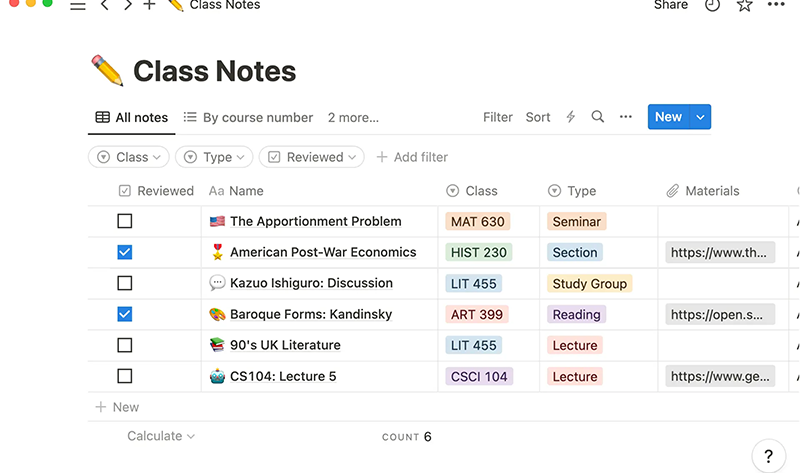
Notion is an all-in-one workspace where you can take notes, build databases, create study schedules, track assignments, and store everything related to school in one place.
Think of it as a highly flexible digital notebook that you can structure however makes sense to you.
How it works
Create pages for each subject, each topic, each assessment task.
Pages can contain text notes, tables, checklists, embedded links, and images. You can build templates – a subject overview page, an essay planning template, an exam countdown tracker – and reuse them across subjects.
Notion syncs across all devices, so your notes are available on your laptop, phone, and iPad.
There are thousands of free high school Notion templates available online, created by other students, that you can import and start using immediately.
Why it works across all year groups
High school involves managing multiple subjects, assessment tasks, and deadlines simultaneously — and that complexity increases with every year.
Notion gives students one place to keep everything, reducing the mental load of tracking what is due and where notes are stored.
Students who use it consistently report feeling less overwhelmed simply because everything is organised and findable.
It is worth introducing in Year 9 or 10, before the subject load of Years 11 and 12 makes disorganisation genuinely costly.
Cost
Free for personal use, which covers everything most students need.
The Plus plan — which adds unlimited file uploads and additional features — is free for students and educators with a valid school email address.
How to download
- All platforms: Sign up free on Notion website
- iPhone: Download Notion in your Apple App Store — free
- Android: Download Notion in Google Play
Goodnotes — Digital Notes Done Right
Best for: Students with an iPad who want to write, annotate, and organise their notes digitally
Recommended year group: Year 7–12 | Best with: iPad and Apple Pencil
What is it?
Goodnotes is the most widely used digital note-taking app among students, particularly those with an iPad and Apple Pencil.
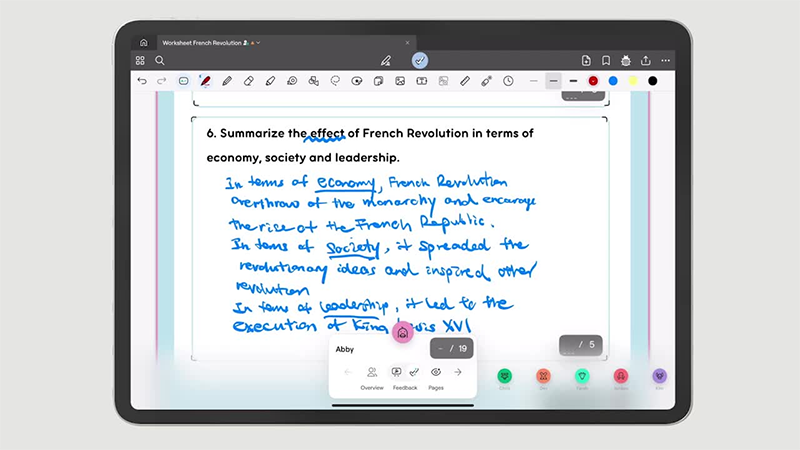
It replicates the experience of writing on paper – but with the ability to search your handwriting, organise notes into folders by subject, annotate PDFs of past papers and worksheets, and never lose a page.
How it works
Create notebooks for each subject.
Write notes by hand using your Apple Pencil, type them, or import a PDF and annotate directly on it.
Your handwriting is searchable – so you can type a keyword and Goodnotes finds every page where you wrote it.
You can export pages as PDFs or images to share or print.
For students studying for exams, annotating past papers directly in Goodnotes – highlighting key words in questions, adding notes in the margins, marking up model answers – is one of the most effective preparation methods available.
Why it works across all year groups
Research consistently shows that handwriting notes leads to better retention than typing.
Goodnotes gives you the retention benefits of handwriting with the organisation and searchability of a digital system.
It works from Year 7 onwards – replacing five heavy subject notebooks with a single iPad – and becomes increasingly valuable in Years 11 and 12 when the volume of notes and the need to organise and search them grows significantly.
Cost
The Goodnotes app is free to download with a limited number of notebooks.
The Goodnotes Essential plan is approximately $14.99 per year, which gives unlimited notebooks and full access.
For students who use it every day, this is excellent value.
How to download
- iPhone and iPad: Download Goodnotes 5 in the App Store — free download, subscription unlocks full access
- Android: Download Goodnotes 5 in the App Store — free download, subscription unlocks full access
- Works best with an iPad and Apple Pencil, though it can be used with typed notes on iPhone